Buying one camera is fairly easy. Buying three to six at once is where small details start to matter. A hub that looks fine for two feeds may feel different once every entrance, parking spot, rear door, and storage area is covered.
The same goes for app control, storage overwrite rules, bundle specs, and the cost of adding cameras later.
Before choosing the best wireless security camera system for a house, small office, storefront, or mixed-use property, slow down and check the parts that are hardest to fix after installation.
A solar-powered outdoor security camera installed on the exterior of a modern suburban home, monitoring the front yard and sidewalk.
Table of Contents
- Plan the best wireless security camera system around future camera count
- Confirm whether every camera works in one app
- Compare the complete bundle cost against the same-brand add-ons
- Confirm NVR or hub storage capacity and overwrite days
- Check resolution and frame rate consistency in the bundle
- Check ecosystem lock-in and third-party camera support
- Conclusion
Plan The Best Wireless Security Camera System Around Future Camera Count
Start with the camera count you may need in two or three years, not only the blind spot you want to fix today. One entrance camera may solve a delivery or access problem, but a full site plan may add parking, side gates, storage areas, rear doors, and indoor entry points. If the first purchase cannot grow cleanly, every later camera becomes a workaround.
Check the system’s stated camera limit and its practical performance limit. Some hubs can pair many cameras but support fewer simultaneous live views, recorded events, or continuous channels. A two-camera kit that feels quick may behave differently when six cameras send high-resolution clips after a storm, party, or delivery window.
Wireless backhaul matters at the same time. Standard Wi-Fi cameras compete with laptops, phones, TVs, and smart speakers. Outdoor placement adds walls, metal garage doors, and long yard distances.
A hub or dedicated backhaul can reduce router load, but only if the system is designed for that role. Before buying, confirm both the maximum supported camera count and what happens when several cameras are active together.
That does not mean buying the largest bundle immediately. It means the first purchase should not block later expansion. A two-camera starter kit makes sense only if the same ecosystem can scale to four or six without splitting control, storage, or alerts.
Confirm Whether Every Camera Works In One App
Do not assume that every camera from a brand behaves the same way in one interface. Confirm that doorbells, floodlights, indoor cameras, outdoor cameras, and add-on cameras can be viewed, configured, and reviewed inside the same app before you build the system around them.
When every camera truly shares one app, three practical benefits usually show up in daily use.
Faster event review. If the driveway camera, side camera, and patio camera share one timeline, you can follow movement across the property without switching apps or rebuilding the route from memory.
Consistent alert tuning. A single app can apply zones, schedules, familiar face settings, and alert types in one place. That makes it easier to reduce false alerts without turning off useful detection.
Cross-camera actions. In a unified wireless security camera system, a gate camera can trigger a nearby light, start recording on another camera, or push a higher-priority alert. Isolated devices usually react only to their own sensor.
If a product line cannot deliver those three benefits across the cameras you plan to use, treat it as a mixed setup, even if the cameras come from the same company.
Compare The Complete Bundle Cost Against The Same-Brand Add-Ons
A complete kit can look expensive on day one, but it may be cheaper than building the same system one camera at a time. Bundles often include the hub, mounts, charging accessories, storage base, and matched cameras at one price.
Buying a starter kit first and adding cameras later can duplicate accessories or push you into higher per-camera pricing.
Compare the cost in the same configuration. If you want four outdoor cameras and one hub, price the four-camera bundle against a two-camera kit plus two official add-ons. Use the same camera count, hub model, and storage on both sides before judging the total.
|
Compare this |
Complete bundle |
Starter kit + same-brand add-ons |
Example Calculation |
|
Target setup |
4 outdoor cameras + 1 hub |
2-camera kit + 2 add-ons |
Same camera count on both sides |
|
Upfront total |
One bundle price |
Kit price + add-on prices |
$399 bundle vs. $249 + $99 × 2 = $447 |
|
Hub and storage |
Included hub, storage, expansion |
Confirm the same hub is included |
Add $100 if the staged path needs another hub |
|
Accessories |
Mounts, solar panels, cables |
Check what add-ons exclude |
Add $25 × 2 if mounts are separate |
|
Per-camera cost |
Bundle total ÷ number of cameras |
(Kit + add-ons) ÷ number of cameras |
$399 ÷ 4 = $99.75 vs. $447 ÷ 4 = $111.75 |
|
Subscription |
One plan or no required plan |
Extra per-device fees |
$5/month × 4 cameras adds $240/year |
If both paths match on hardware but the bundle still costs less, the full kit is usually the better buy. If the add-on path is cheaper only because it skips storage, solar parts, or warranty coverage, the gap is not a real saving.
This is also where long-term cost matters. The best wireless security camera system is not always the cheapest box. It is the option that avoids duplicated hubs, overlapping cloud plans, incompatible accessories, and expensive replacements when the fourth or fifth camera is added.
Confirm NVR Or Hub Storage Capacity And Overwrite Days
A 16 GB hub reads fine on paper. What it doesn’t tell you is how many days of footage that translates to once the cameras are running. Two quiet event-based cameras covering a side entrance are one thing.
A set of four or six 4K cameras pointed at a driveway, a street, and a rear yard in constant motion is another, and they can overwrite the same storage in a fraction of the time.
The question worth asking before buying isn’t just how much storage is included. It’s whether a hard drive or NVR can expand it later, and how many days the system actually retains under the recording settings you plan to use.
Event clips burn through space differently than continuous feeds, and higher resolution costs more than lower resolution in ways most spec sheets don’t quantify.
H.265 compression is worth confirming on the hub. It can extend retention compared to H.264 at the same image quality, but not every hub applies it consistently across all cameras. Check the settings rather than assuming it runs by default.
The practical calculation is simple. Count the cameras, estimate whether each one records events or continuous video, then decide how many days of history you need before the oldest footage can be overwritten.
Enough storage means you can notice a problem, review the event, and save the clip before the loop cycles. If you are shopping a prime day security camera deal, keep retention on the checklist. A lower price is easier to justify when the discounted kit still holds enough history for how your cameras record.
Check Resolution And Frame Rate Consistency In The Bundle
Best wireless outdoor security camera system bundles can hide mixed hardware. A box may advertise 4K Ultra HD because one camera is 4K, while the other cameras use lower resolution or lower frame rates for secondary zones. That is acceptable only if you know which camera goes where.
Resolution affects detail. Frame rate affects motion clarity. A sharp front-door camera does not compensate for a rear camera that blurs moving subjects at night.
When auditing a bundle, compare every camera in the kit for resolution, frame rate, night vision, field of view, weather rating, power source, detection type, audio, and storage behavior.
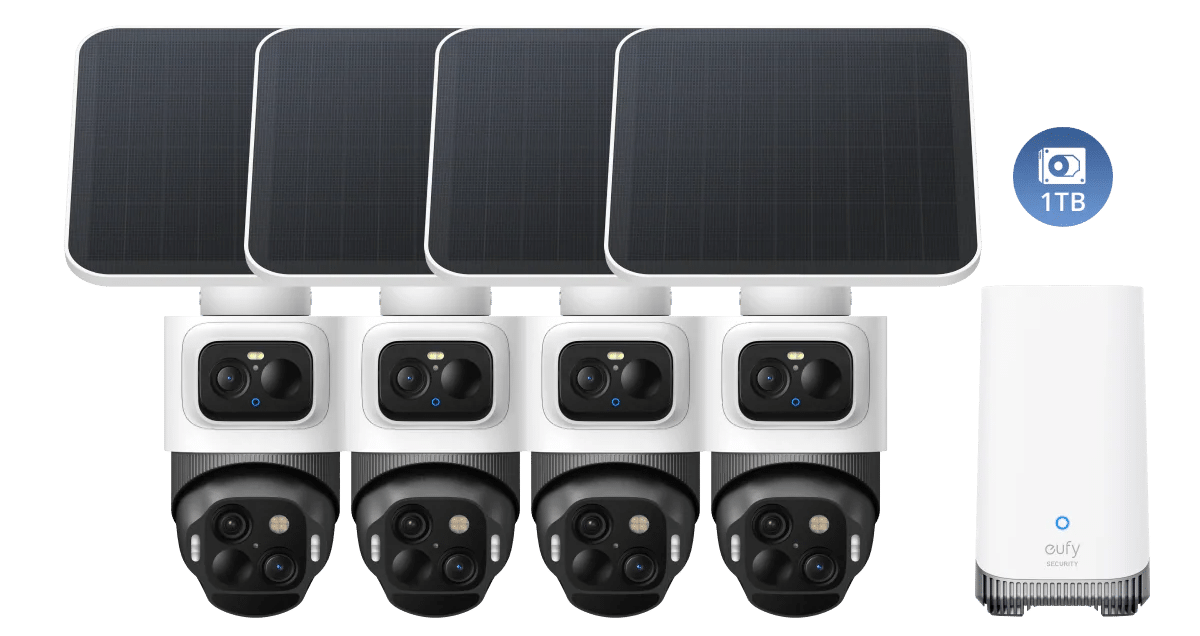
The eufyCam S4 4-Cam Kit is one example of a kit built around consistent hardware. Each camera covers a wide entrance with a fixed 4K lens, then uses a 2K PTZ lens to lock on and follow movement, so one unit handles both overview and detail.
SolarPlus™ 2.0 also helps with multi-camera outdoor deployment, where running power cables to every location is impractical. Since all four cameras feed into HomeBase™ S380 with storage expandable to 16 TB, the kit stays on one app and one storage loop.
Check Ecosystem Lock-In And Third-Party Camera Support
The longest cost of a wireless security camera system is often the switching. Once mounts are drilled, detection zones are tuned, users know the app, and storage habits are built, changing brands becomes inconvenient. Check lock-in before checkout, not after the fourth camera is mounted.
Start with the cameras you may add later. Check whether the same app can handle doorbells, floodlights, indoor cameras, outdoor cameras, and add-on battery cameras.
Then confirm whether the hub can support more cameras than the starter kit includes, whether local storage can expand without replacing the system, and whether core features still work without a subscription.
Then check third-party support. Most dedicated security ecosystems do not natively accept cameras from other brands inside the same app.
Some support ONVIF, RTSP, Synology NAS, or Home Assistant workflows, but these often require manual setup and may lose AI detection, rich notifications, or unified playback. If mixing brands matters to you, confirm the exact integration before buying.
If you want a system that stays useful for years, use a six-point checkout test. Confirm the app is unified, the camera count has room to grow, the bundle cost beats add-ons, the storage loop matches your review window, the cameras share consistent video quality, and the ecosystem supports the automation or recorder tools you actually plan to use.
Conclusion
A wireless camera system should be judged as a site security network, not as a pile of cameras. The right choice depends on app coverage, hub bandwidth, storage scale, bundle spec consistency, and ecosystem switching cost.
A coordinated kit is often the smarter long-term buy when it reduces app fragmentation and storage confusion. Before buying, map the property, count future cameras, and verify the architecture behind the specs. To compare current kit options, start with the eufy security camera system collection.